Figma Crash Course for Beginners
1 lesson, about 1.5 hours
A single ninety-minute session taking Figma from an empty file to a working interface: frames, components, auto layout and prototyping, aimed at somebody who has never opened it.
Figma

Hey there, my name is Adi Purdila, I’m a web designer and developer and this class is about designing a one-page restaurant website in Figma.
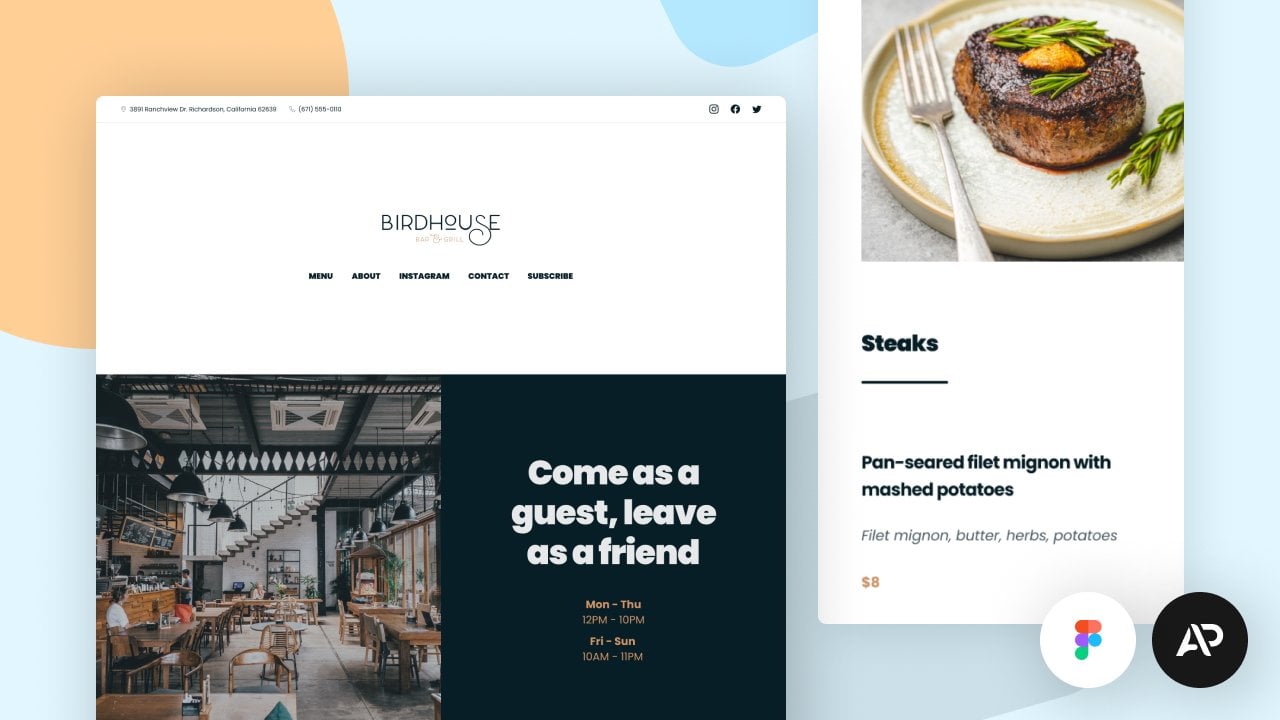
Together we'll design a simple website for a fictional restaurant called Birdhouse Bar & Grill. Among other things, it features a nice food menu section, a menu navigation, Instagram photo gallery, a contact form with a map and also a newsletter signup area.
By taking this class, I guarantee you’ll learn 2 things: UI/UX design and Figma.
In terms of UX design you'll learn how to read a project brief and, based on it, create wireframes. But we’ll also discuss information architecture or how we structure the content in the webpage.
Then, it's on to the user interface or UI design. Here, you'll learn how to define the typography so it matches the type of website you're designing and how to pick appropriate colors and apply them to various elements. You’ll learn how to use the 8pt system for spacing and sizing so you'll never have to guess what values to use for margin, padding, width or height. And you'll also learn how to create responsive designs. We'll initially design for large screens and then create versions for medium and small.
And while this is happening, you're also learning how to use Figma for website design. Of course, you'll learn the basics like working with frames, text, colors, shapes, pages and keyboard shortcuts. But also, you'll get a taste of the more advanced features.
You'll learn how to use auto layout for alignment and moving elements around very easily. You'll also learn about the various resizing modes in Figma like hug-contents or fill-container and when you should use each one.
There’s also a class project available so you can follow along and apply the theory.
All in all, I think this class is perfect for beginners because I’ll go through every step of the process — from wireframing to designing a responsive version for small screens.
I look forward to seeing you in class!
UPDATE
Since this class was recorded, Figma’s interface has changed in a few places. The workflows and concepts you’ll learn here are still valid, but some buttons, menus, or panels may look different than what you see in my videos.
To help you out, I’ve added a bonus video called “Figma 2025 Update: What’s Changed” where I walk through the new UI and point out the main changes. Be sure to watch that if you’re ever confused.
And if something doesn’t match what you see on your screen, feel free to ask here in the Discussions — I’ll be happy to clarify. Chances are, if you have the question, other students will too!
Thanks, and happy designing!
— Adi
Adi Purdila
No reviews yet. Be the first to review this course.
1 lesson, about 1.5 hours
A single ninety-minute session taking Figma from an empty file to a working interface: frames, components, auto layout and prototyping, aimed at somebody who has never opened it.
144 hours
A 144-hour UX and UI design certificate from Noble Desktop, taught live in New York or online, ending in a portfolio and a job-ready resume.
120 hours
A 120-hour UI design certificate from Noble Desktop covering Figma, Photoshop and Illustrator, taught live in New York or online.
420 hours
A 420-hour generative AI course from Noble Desktop, taught live in New York or online.
264 hours
A 264-hour generative AI course from Noble Desktop, taught live in New York or online.
282 hours
A 282-hour generative AI course from Noble Desktop, taught live in New York or online.
1 lesson, about 1.5 hours
A single ninety-minute session taking Figma from an empty file to a working interface: frames, components, auto layout and prototyping, aimed at somebody who has never opened it.
7 lessons, about 1 hour
A 7-lesson playlist on UX/UI design, 54 minutes, published on YouTube by Figma. Watched here on the course page.
9 hours
Hi there - my name is Dan Scott & welcome to Figma Essentials. Together - you and me - are going to learn everything you need to get started working as a UX Designer using Figma. We’ll use this UI UX design tool to create beautiful User Interfaces and engaging prototypes. Most importantly... we'...
1 hour
Development of advanced techniques in Illustrator and Photoshop is the focus of this course, with the goal of helping you increase your proficiency with vector brushes and pattern design. You will craft a gorgeous floral line-art which can be finished in oh-so-many ways! In this course you will lear...
24 minutes
Transform humble materials into luxurious fabrics through the craft of natural dyeing! This wonderful art combines textile design with sustainable living. Using food materials you can find in your kitchen, we'll brew three lovely colors from scratch: Pale pink from avocado pits Golden yellow from on...
23 minutes
Give your denim a new lease of life by creating something totally original. With fabric painting, you are the artist and the textile designer! In this class we will cover the basic of fabric painting, learn what materials to use and discuss the best practice while working towards creating your weara...
Subscription