Figma Crash Course for Beginners
1 lesson, about 1.5 hours
A single ninety-minute session taking Figma from an empty file to a working interface: frames, components, auto layout and prototyping, aimed at somebody who has never opened it.
Figma

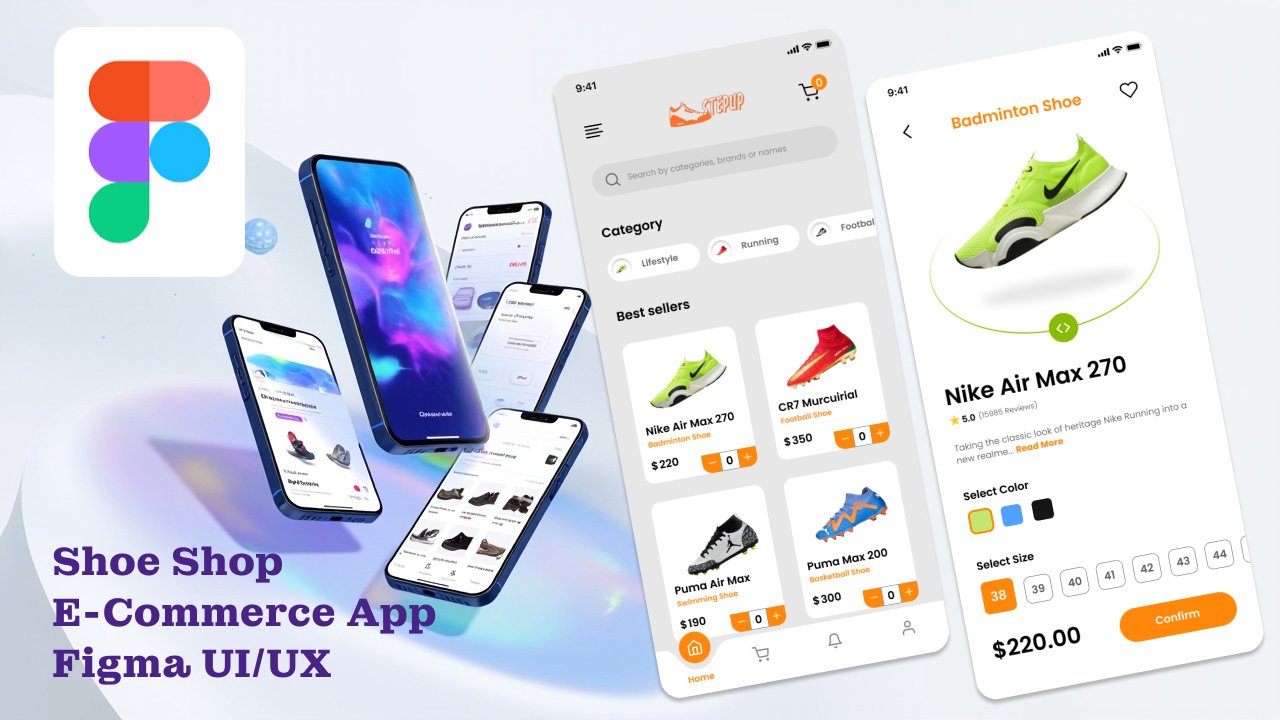
Dive into UI/UX design with Figma and learn how to create a complete Shoe Shop E-Commerce mobile app from scratch! This course is perfect for all skill levels—whether you’re a beginner just starting with Figma or an intermediate designer looking to level up your skills.
You’ll start with the fundamentals, learning how to structure a Figma project, explore all essential tools, and create basic prototypes. Then, step by step, you’ll design a fully functional e-commerce mobile app while following industry best practices, including style guides, system design, and reusable components. By the end of this course, you’ll have a polished, interactive mobile app prototype to showcase in your portfolio.
What You’ll Learn in This Class:
- How to set up a Figma project structure for efficiency and scalability
- Mastering Figma tools for design and prototyping
- Creating both basic and advanced interactive prototypes
- Designing a real-world Shoe Shop E-Commerce mobile app
- Building and applying style guides, typography, and color systems
- Following best practices in UI/UX design and Figma project organization
- Designing reusable components and consistent design systems
- Enhancing your portfolio with a complete, interactive app prototype
Projects You’ll Design:
- A Shoe Shop E-Commerce mobile app from scratch
- Splash and Home screens with interactive elements
- Product listing and details screens
- Cart and checkout screens with advanced prototyping
- Search and category screens/navigation
- Reusable UI components such as buttons, cards, and navigation bars
- A complete style guide and design system integrated into the project
This class is designed to help anyone, regardless of experience level, go from Figma basics to creating a professional, advanced prototype ready for a portfolio.
This class is co-taught by Abdus Salam Mahabub and me. Together, we’ll guide you from the very basics of Figma all the way to advanced prototyping.
In the first part of the class, I’ll cover the fundamentals of Figma—including project setup, essential tools, and creating basic prototypes. Then, Abdus Salam Mahabub will take over and teach you how to design a complete Shoe Shop E-Commerce mobile app UI/UX with advanced prototyping and professional best practices.
By the end of this class, you’ll gain both a solid foundation in Figma and the ability to create a real-world, interactive mobile app prototype.
Yazdani Chowdhury
No reviews yet. Be the first to review this course.
1 lesson, about 1.5 hours
A single ninety-minute session taking Figma from an empty file to a working interface: frames, components, auto layout and prototyping, aimed at somebody who has never opened it.
144 hours
A 144-hour UX and UI design certificate from Noble Desktop, taught live in New York or online, ending in a portfolio and a job-ready resume.
120 hours
A 120-hour UI design certificate from Noble Desktop covering Figma, Photoshop and Illustrator, taught live in New York or online.
420 hours
A 420-hour generative AI course from Noble Desktop, taught live in New York or online.
264 hours
A 264-hour generative AI course from Noble Desktop, taught live in New York or online.
282 hours
A 282-hour generative AI course from Noble Desktop, taught live in New York or online.
1 lesson, about 1.5 hours
A single ninety-minute session taking Figma from an empty file to a working interface: frames, components, auto layout and prototyping, aimed at somebody who has never opened it.
7 lessons, about 1 hour
A 7-lesson playlist on UX/UI design, 54 minutes, published on YouTube by Figma. Watched here on the course page.
9 hours
Hi there - my name is Dan Scott & welcome to Figma Essentials. Together - you and me - are going to learn everything you need to get started working as a UX Designer using Figma. We’ll use this UI UX design tool to create beautiful User Interfaces and engaging prototypes. Most importantly... we'...
1 hour
Development of advanced techniques in Illustrator and Photoshop is the focus of this course, with the goal of helping you increase your proficiency with vector brushes and pattern design. You will craft a gorgeous floral line-art which can be finished in oh-so-many ways! In this course you will lear...
24 minutes
Transform humble materials into luxurious fabrics through the craft of natural dyeing! This wonderful art combines textile design with sustainable living. Using food materials you can find in your kitchen, we'll brew three lovely colors from scratch: Pale pink from avocado pits Golden yellow from on...
23 minutes
Give your denim a new lease of life by creating something totally original. With fabric painting, you are the artist and the textile designer! In this class we will cover the basic of fabric painting, learn what materials to use and discuss the best practice while working towards creating your weara...
Subscription